
Command of technological working tools is among the most important skills for professional translators. During the course of my 25 years as a freelance translator, I’ve witnessed an enormous step forward in the field of translation technology, i.e. in technological tools that are typically used in a translation business.
In this article, I’ll briefly share which technology tools I use for which tasks in my work as a professional translator.
Table of Contents
Translation management
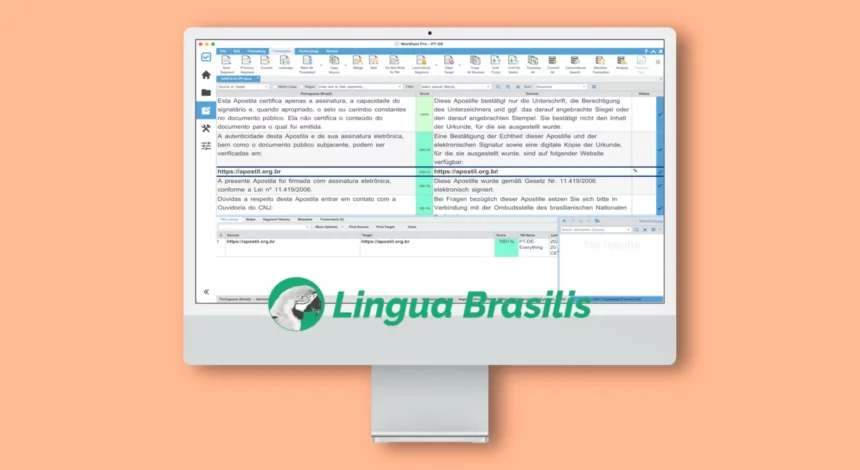
For every translation, even the shortest ones – including certified translations of official documents –, the most important working tool I use is the professional Computer-Assisted Translation tool CafeTran Espresso. Before, I used Wordfast Pro for 8 years, before that memoQ and SDL Trados Studio for 15 years, and Wordfast Classic in the first half of the 2000s). I use it above all to save and manage all my translations.
Computer-Assisted Translation (CAT) tools are for professional translators much like AutoCAD for architects and Photoshop for graphic designers: you can still work without them if you really must, but they are indispensable for high productivity and data retrieval.
Within my CAT tool, I also maintain my large bilingual terminology database containing many glossaries with specialised terms I myself have painstakingly researched, compiled and validated in the past 25 years.
Together, these materials (translation memories and glossaries) are, so to speak, a treasure chest reflecting my professional experience as a specialised translator and being readily available when I’m working on new translation projects, which, in turn, considerably increases the quality and speed of the translation services I offer.

Quality assurance
For translation quality assurance (QA), I rely primarily on the highly advanced QA features included in the programme mentioned above. These help me with, for instance, finding and eliminating terminology mistakes, spellchecking, partially automating compliance with language conventions for number formats, or achieving language consistency by reusing already translated text segments.
All of that happens in real time when I translate as well as at a later stage when I’m performing a bilingual revision of the same translation.
However, these are only the first and second stages of quality assurance; the third one is a monolingual revision of a translation without checking the source text and without resorting to technological tools.
Text and speech recognition
To prepare scanned documents for translation, I used for many years ABBYY FineReader, an optical character recognition (OCR) programme that is a kind of standard equipment for older generations of translators.
Currently, I use an Apple Shortcut that I set up myself, and it suits my needs perfectly. If the scanned images’ quality is really good, most of the scanned text is easily recognised, sometimes even handwritten parts. OCR is definitely an essential translation technology element in my office.
Nonetheless, I still have to manually format texts every time, because, unfortunately, the character recognition technology hasn’t evolved so much to the point of always generating a perfectly formatted text; in addition to that, as a perfectionist, I want my certified translations to be visually appealing (as opposed to the untidy formatting I’ve seen in other sworn translators’ work).
When translating texts with simple formatting into German, I occasionally used in my Windows years an costly speech recognition software called Dragon Professional, which didn’t support Portuguese. Currently, I use the free dictation functionality that is included in my Mac, since Apple offers an unbeatable speech recognition and audio transcription technology in many languages.
However, speech recognition is not relevant enough in my translation business, because most documents I translate have complex formatting, contain many proper nouns from other languages and, therefore, aren’t suitable for being processed with this technology.
Besides text and speech recognition, I’m a power user of keyboard shortcuts to avoid always having to type the same text snippets, easily open certain apps and files and quickly access internet search engines. For such daily tasks and so many more, a great app called Alfred helps me a lot.
Client management
For client management, I’ve used the project management programme TO3000 (TO means Translation Office) for many years, allowing me to interconnect project, client and accounting data. When I decided to work less for international translation agencies and more often for private individuals in Germany, the programme became too cumbersome and even superfluous.
As a result, I ended up using Microsoft Excel again, this time taking advantage of Excel’s more advanced features. These include pivot tables to interlink data and to generate extremely useful statistical views.
Currently, I use a database programme conceived especially by myself to fulfil my own needs for all administrative tasks, such as:
- managing customer data and customer reviews,
- writing proposals and invoices,
- project management and indexing of certified translations, and
- accounting (preparing data to be sent to my accountant).
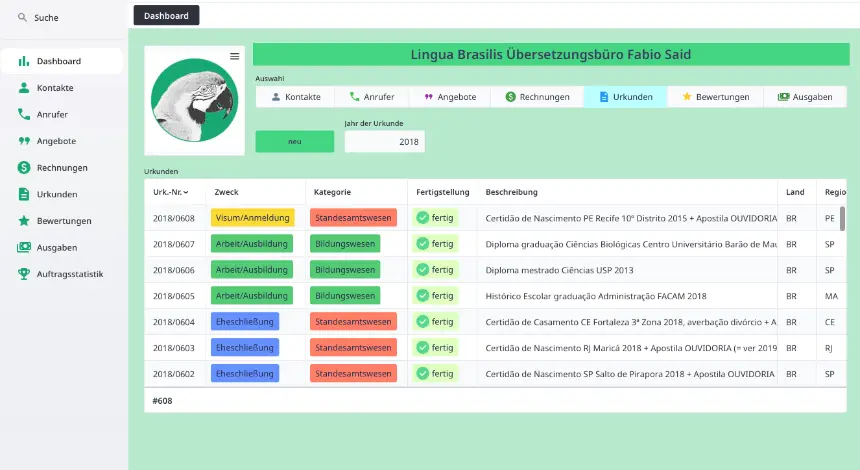
All of those are interconnected and complemented by my email client Mozilla Thunderbird (free, but incremented with paid add-ons).
Secure email communications
While there are translators who correspond with their clients using free email accounts such as Gmail, Yahoo or Hotmail, I don’t think that leaves an impression of professionalism. Free email providers have serious privacy issues exposing both the translator and the client to unnecessary risk.
That’s why I communicate with clients only through my self-hosted email business accounts. In addition, I never use WhatsApp, Facebook, Instagram or other social networks for pre-sales or customer service.
All pre-sales communication is done through the innovative, privacy-complying Online Assistance tool included in my contact page, which offers the best of both worlds: legally safe online customer support enabled by state-of-the-art technology.
Professional data management
Translators, being members of a creative profession, aren’t necessarily good ad data management. For instance, most sworn translators have no intercultural specialisation, translating official documents as a side job, not as their main occupation – and because of that their way of working is still stuck in the 1990s. They do everything manually, without registering or reusing information in a structured way, because this would have been too much work for them compared to the money they make.
None of that happens in my specialised translation business. Instead, I do serious, professional data management, because I know that the success and the survival of my business depends on it. This means specifically that:
- All computer files containing official documents and source texts are named, categorised and saved following a professional system.
- All PDF files containing scanned official documents are searchable.
- I use a professional text search programme (FoxTrot Professional Search) to quickly access information when a customer makes en enquiry or when executing jobs.
- All translated sentences are saved in my CAT tool together with the corresponding sentence from the source text, creating a huge archive of translations and resulting in huge productivity and quality increases over time.
Whoever thinks all of that is too much work has already missed the train of technological advances in the translation industry and should be looking for a different occupation instead.
Technological working tools are nothing more than utensils
Technology is definitely a part of a translator’s daily life. Because of that, unknowing industry outsiders, unprepared translators with a background in other areas or young inexperienced colleagues may be under the impression that having good command of technology tools is enough to become a successful translator. Nothing is further from the truth.
In fact, actual translation skills are still the pivotal requirement for achieving success as a professional translator.
That means that if a translator finds it difficult to, for instance, understand the source text or write the target text, even the most advanced technology won’t be of any help. Technology is and will always be nothing more than supplementary help, and only a qualified professional is able to really benefit from it.
